More than a silent screen.
Bring your camera, voice, and computer audio into the take. Give people the context a screenshot can’t.
 Keepshot
SCREEN RECORDING, WITH LESS FUSS
Some things are easier to show. Turn a bug, an idea, or a quick walkthrough into a video—with your screen, your voice, and Keepshot in your menu bar.
A quick recording. A file that’s yours.

FROM “LET ME SHOW YOU” TO DONE
Explaining a bug shouldn’t take longer than finding it. A quick demo shouldn’t become a production. Keepshot keeps the recording close at hand.
Open Keepshot right where you’re working. Your recording controls are a click away.
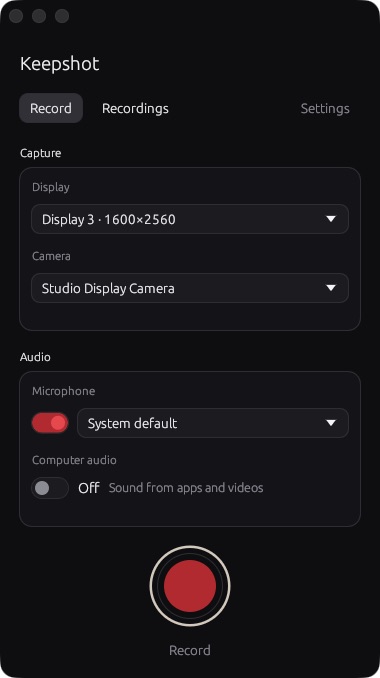
Choose your screen, camera, and microphone. Show the details while you explain them.
Get an MP4 in your chosen folder. Attach it to a ticket, send it to a teammate, or edit it your way.
MADE FOR THE WAY YOU WORK
Bring your camera, voice, and computer audio into the take. Give people the context a screenshot can’t.
Move between displays—or paired Macs and Linux computers on your network—without starting another recording.
Keepshot saves directly to your device. No automatic upload. No hosted library to manage. Share the file wherever you already work.
OWN YOUR TOOLS
Buy once. Keep recording.
Keepshot
$29 once
Permanent use of Keepshot 1.x. No subscription. All 1.x updates included. Future major upgrades are optional purchases.
$49 once
Everything in Record, plus live streaming from the same take.
Buy Keepshot Buy Record + Live
A FEW DETAILS
No. Buy Keepshot once for permanent use of version 1.x, including all 1.x updates. Future major upgrades are optional purchases.
To a folder you choose on your device, as MP4 files. Keepshot doesn’t automatically upload them. Send them through a service you already use, or open them in your preferred editor.
Yes. Pair Macs and Linux computers on the same network with a six-digit code. Switch between their screens during the take and keep one video. Your camera, microphone, and audio stay with the recording computer; remote computer audio isn’t captured.
Live streaming over RTMP or RTMPS while you record. Your local file keeps its own quality settings and keeps recording if the stream disconnects. You can add Live to Record later for $20.
One license covers up to five activated computers. Computers you only record remotely don’t use a seat.
Your purchase includes a license key. Activate each computer online once, then record offline. Your recordings stay on your device.
LESS EXPLAINING. MORE SHOWING.
With your permission, Google Analytics uses cookies to measure page visits and platform selections on this website. Optional analytics stays off until you allow it. This does not track your recordings or activity in the Keepshot app.
Change your choice anytime in Analytics preferences. We remember your choice for 180 days. Website privacy · How Google uses this data.